
Search
How to search emails inside a large MBOX file
Practical ways to find one email among thousands: what to type, how to narrow results and what search cannot see.
Read articleWhere Thunderbird keeps your mail on Windows, macOS and Linux, which files matter and how to read them without starting Thunderbird.
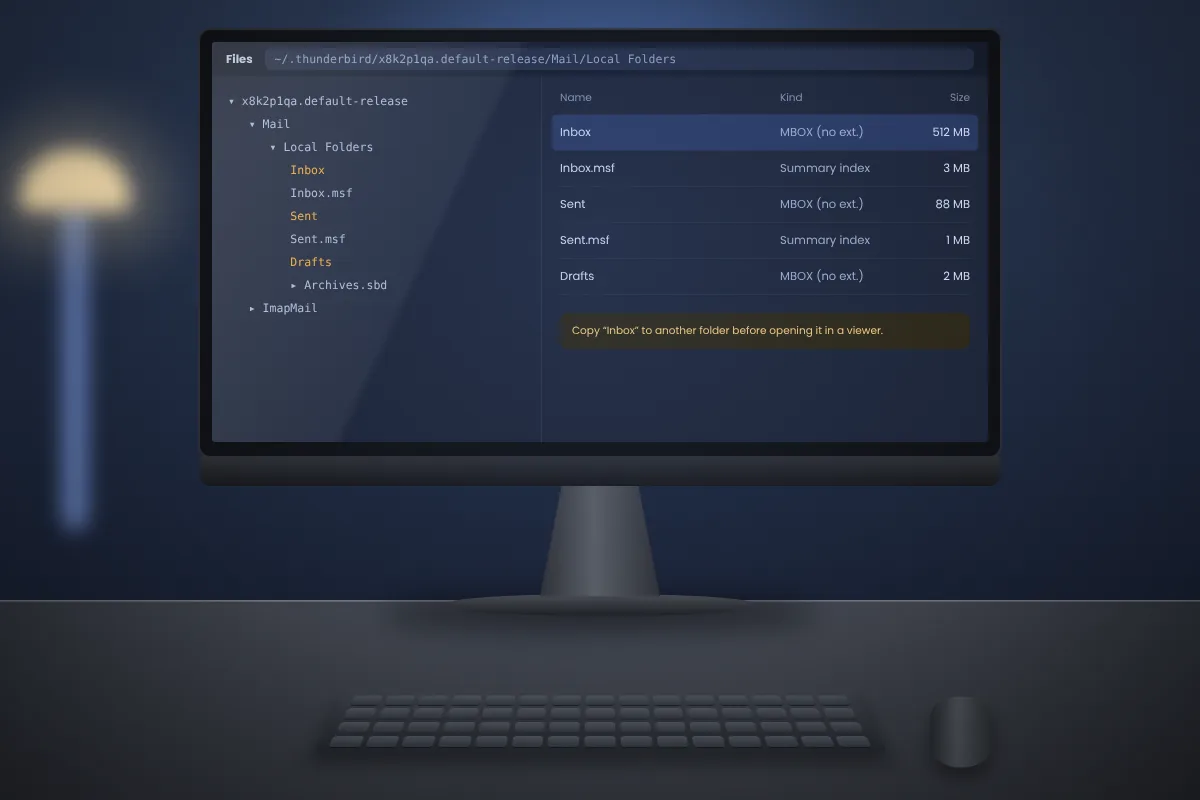
Thunderbird keeps your mail in ordinary files on disk. By default each folder, such as Inbox, Sent or Archives, is a single MBOX file. That means you can read old Thunderbird mail even when the program is not installed, the profile is broken or you are working from a backup drive.
If Thunderbird still runs, the easiest way is from inside the program: open Help → Troubleshooting Information, find Profile Folder and click Open Folder.
Otherwise, go to the default location for your system:
| System | Profile location |
|---|---|
| Windows | %APPDATA%\Thunderbird\Profiles\ |
| macOS | ~/Library/Thunderbird/Profiles/ |
| Linux | ~/.thunderbird/ |
Inside you will see one or more folders with random-looking names ending in something like .default-release. The most recently changed one is usually the active profile.
Inside the profile, mail is split by account type:
In each of these you will see pairs of files:
Inbox, to another folder such as your Desktop.Tip: on Windows, the AppData folder is hidden. Paste %APPDATA%\Thunderbird\Profiles into the File Explorer address bar to jump straight there.
When you delete a message in Thunderbird, it is first only marked as deleted inside the MBOX file. It is physically removed when the folder is compacted. Until then, a viewer that reads the raw file can still show it.
This can be useful if you are looking for something deleted by mistake. If you want the file to match what Thunderbird shows, compact the folder first by right-clicking it and choosing Compact.
For IMAP accounts, Thunderbird stores full message copies only when offline synchronisation is on. If it was off, the local file may contain headers only or a subset of messages. Check the account's Synchronisation & Storage settings if a file looks smaller than expected.
Thunderbird can also use Maildir storage, where each message is a separate file inside cur folders. If you see folders instead of single files, the profile uses Maildir, and an MBOX viewer is not the right tool. Thunderbird itself, or a Maildir-aware program, will read those.
Practical ways to find one email among thousands: what to type, how to narrow results and what search cannot see.
Read articleHow attachments are stored inside MBOX, how to save them one at a time or in bulk, and which files to treat with care.
Read articleThree common email file formats side by side, with notes on conversion and which one suits backups, sharing and Outlook.
Read article